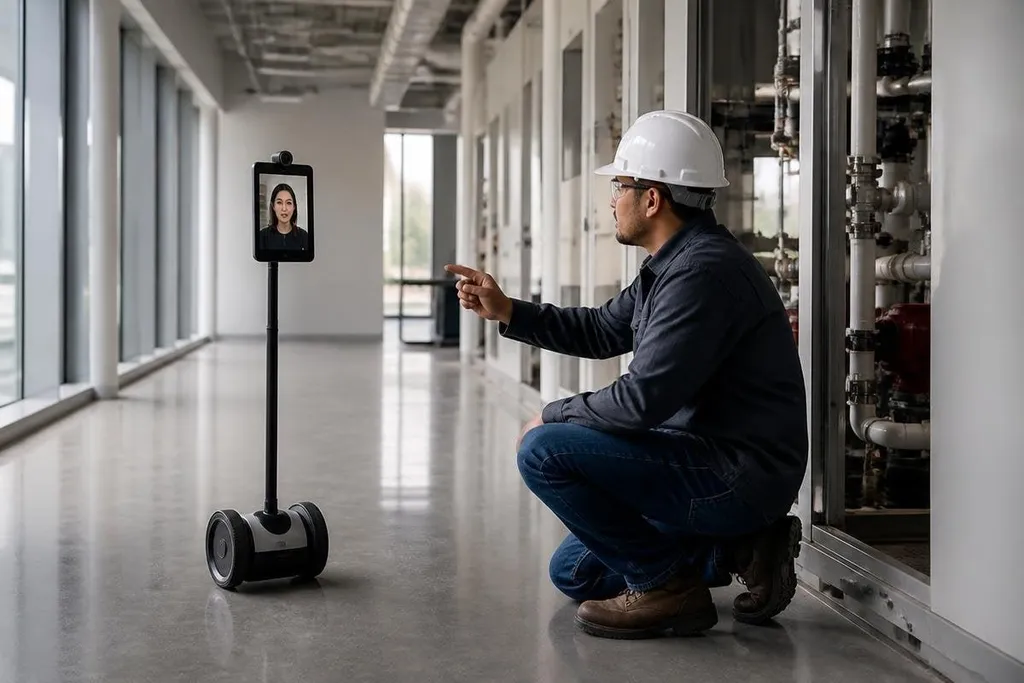
A telepresence robot gives a remote worker a camera, microphone, screen, and wheels. That extra movement changes a video call from a fixed view into a way to take part in a place.
For people who need to inspect rooms, join work on site, or speak with others face to face, the value comes from physical presence at a distance. The robot still depends on a person at the controls, so its usefulness rests on the job, the building, and the network.
Quick read
- A moving camera can show more than a laptop fixed to a desk.
- Remote users can choose where to look and whom to speak with.
- Stairs, weak network links, charging, and privacy can limit daily use.
Why movement changes the call
A normal video call gives the remote person one view from one position. The robot can move through a room, turn toward a speaker, and change its height or angle when the hardware supports those actions.
That matters in a meeting where people move around, in a classroom where a teacher needs to look at different desks, or in a work area where the remote user needs to inspect more than one point. The person at home gets control over the view instead of waiting for someone nearby to move a laptop.
The robot also gives people on site a clear place to direct their attention. A screen shows the remote user’s face, while speakers carry their voice. This can make a short exchange feel more direct than audio from a wall speaker or a small window on a monitor.
Where telepresence robots help
The strongest use cases share one need: a person must be present, but their body doesn’t need to carry out the physical work.
A remote manager can attend a meeting and move between nearby groups. A teacher can speak with a class from another location. A specialist can look around a site and ask a worker to show a machine, panel, or stored item.
A family member in a care setting can take part in a visit when travel is difficult. These jobs don’t require the robot to lift, sort, or repair anything, because its task is to place a person’s eyes, ears, and voice inside the room.
That keeps the system easier to understand than an autonomous robot, because a human makes the decisions during the visit.
A telepresence robot still depends on its camera, screen, wheels, and network link. Dated Robot24.com robotics coverage can place those parts beside the task and test setting, so you can judge what the operator could see and control. The next limit is physical: a remote user can steer the robot, but walls, stairs, and a weak signal still decide where it can go.
The limits are physical
The robot can move only where its base can travel. Door thresholds, narrow gaps, loose cables, crowded floors, and stairs can stop the visit before the conversation starts.
Network quality matters too. A delayed video feed makes driving harder, and a broken connection can leave the robot in the wrong place. The site needs a charging plan, clear routes, and someone who can help if the robot gets stuck.
Privacy needs a clear rule before the first call. People should know when the camera and microphone are active, who can join, and where recordings go if the system stores them. A screen with a face on it doesn’t give the remote user permission to look into every room.
The open issue is the daily cost of these limits. A machine may work well for scheduled visits but prove awkward for quick, repeated trips across a busy site. Product pages rarely answer that question on their own.
Before you buy
Use this checklist during a live trial:
- Map the route: check doors, lifts, thresholds, turning space, and stairs.
- Test the link: drive the robot from the place where the remote user will work.
- Watch the handoff: see who answers when the robot stops or loses connection.
- Set privacy rules: mark camera areas, microphone use, access rights, and storage.
- Count the visits: compare the robot with travel, staff time, or a normal video call.
The trial should use the real building and the real people who will run the visits. A clear floor in a product demo says little about a crowded workplace.
I'd treat telepresence robots as remote presence tools, not general-purpose workers. They make sense when seeing, hearing, speaking, and choosing where to move are the job; they make less sense when the task needs hands, heavy loads, or independent decisions.
Their next test is simple: can a remote person complete a normal visit without someone beside the robot at every turn? The sites that answer yes will have a practical reason to keep using them.